Workflow automation means that a recurring task is triggered and carried out automatically as soon as a specific event occurs – without you having to step in. It’s not rocket science, just simple mechanics. An everyday example: a new invoice lands in your inbox, a program recognizes it, reads out the data and automatically creates it in your accounting software. For you as a small business without your own IT department, this mainly means: less copy-and-paste, fewer forgotten steps, more time for the work that really matters.
Key takeaways
- Workflow automation means: an event (the trigger) automatically sets off a response (the action) – you no longer have to step in.
- Only three terms matter: trigger, action and API. The chain itself consists only of trigger and action; the API connects the two technically.
- Automation pays off when a process repeats often and always runs the same way – for exceptions with changing rules, the manual route often remains the better choice.
- You don’t need technical knowledge for this, but a clearly described process and programs that offer an API.
- Automation reaches its limits where situational understanding or exceptional decisions are needed – that’s exactly where you stay in charge.
How does an automated process differ from a manual one?
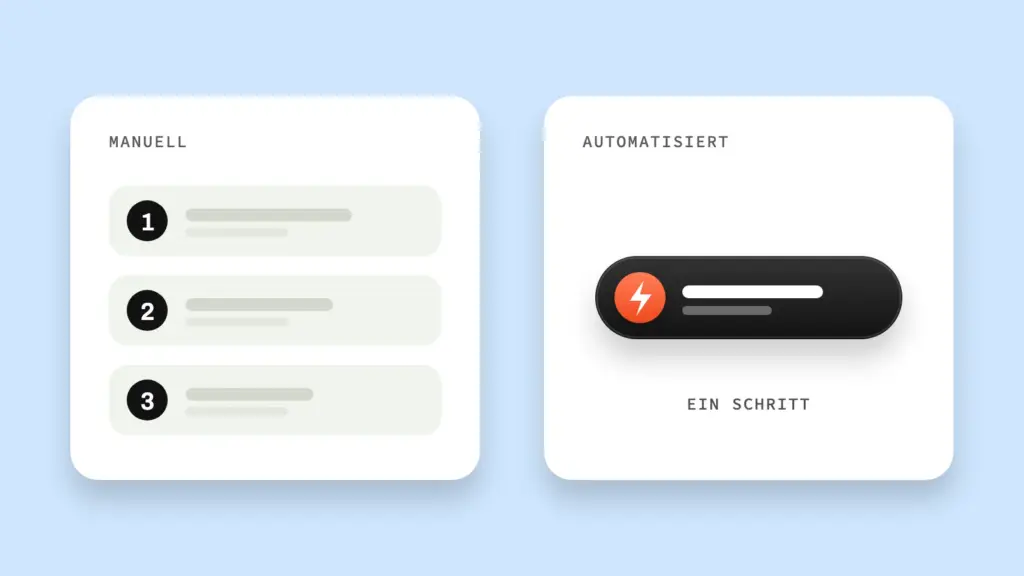
The difference lies in stepping in: in a manual process you handle every step yourself; in an automated process you only step in where judgement is really needed – the rest runs by itself as soon as the triggering event occurs. You can see this best in a situation you know: a new enquiry via your contact form.
Without automation, someone reads the email, enters the contact by hand into a list or the CRM and then types a first reply. Three manual steps. For every single enquiry, no matter how many come in on a given day.
With automation, steps two and three take care of themselves. The contact lands automatically in the customer list, the confirmation goes out immediately – without you having to think about it. You remain responsible only for what really needs your judgement: the actual reply to a more complex enquiry. The machine does the rest.
And that’s the real gain: it isn’t the single enquiry that saves time, but the sum of ten, twenty or fifty enquiries per week that all go through the same process.
What are triggers, actions and APIs?
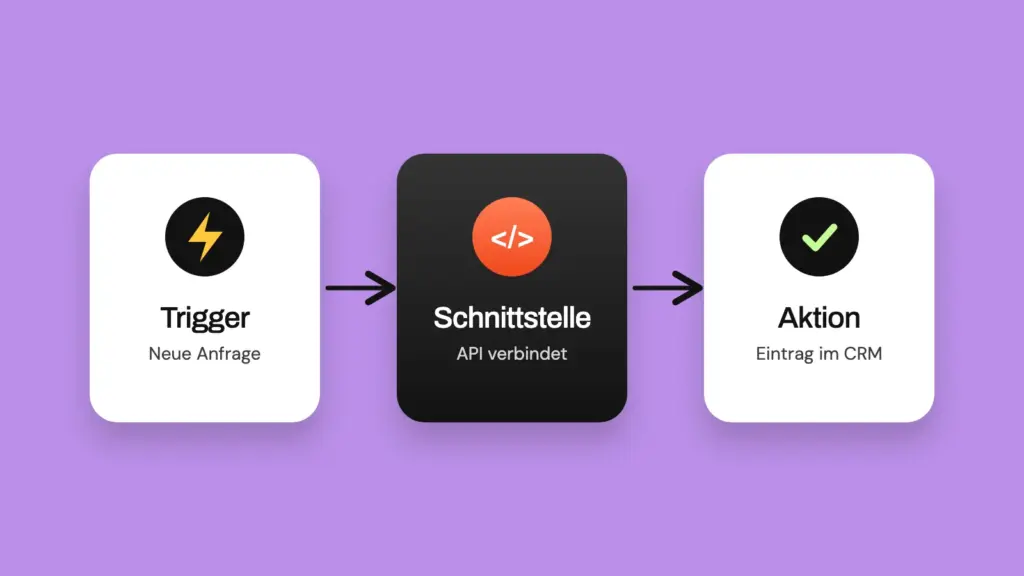
Three terms, and you understand the principle behind every automation: the trigger starts a process, the action is the response to it, and the API (application programming interface) is the technical route through which the programs involved talk to each other. The chain itself has only two links – trigger and action. The API isn’t a link of its own but the connection between them.
| Term | What it is | Everyday example |
|---|---|---|
| Trigger | The event that starts it | A new invoice lands in the inbox |
| Action | The response that follows | The invoice is captured automatically and created in the accounting software |
| API | The technical route through which two programs exchange data | Inbox and accounting software exchange the invoice data automatically |
Without an API, the inbox and accounting software in this example couldn’t talk to each other automatically at all. It’s the technical prerequisite for an automation tool to connect trigger and action in the first place – without you having to code anything yourself. In everyday language, this principle of trigger and action is often also called process automation – strictly speaking that’s the umbrella term, but this is exactly the mechanism meant.
In day-to-day terms, this means: you define which event should start the process and what should happen next. The API takes care of the technical connection between the programs in the background. That’s why, before choosing a tool, it’s always worth checking whether the programs you already use offer an API at all – without one, automation remains theory in the vast majority of cases.
What does workflow automation look like day to day in a small business?
In practice, workflow automation in small and mid-sized businesses often looks unspectacular: a new invoice in the inbox is captured automatically and assigned to the right cost centre instead of being typed up by hand. Sounds trivial? It is – and that’s exactly why it’s so effective. Small, often overlooked tasks like these add up to real working hours over weeks and months.
More examples from your day-to-day, each as trigger → action:
- New application by email → documents land automatically in the right folder, the confirmation of receipt goes out immediately
- Appointment booked via the website → adds itself to the calendar, a confirmation email goes out automatically
- New customer enquiry in the shared inbox → is categorized automatically and forwarded to the right person
- New order in the ordering or shop system → automatically creates a matching record in the customer management system
- Payment reminder due → is sent automatically on the scheduled date, without you having to keep an eye on the calendar
An example I build into almost every website project: a visitor signs up for your newsletter, immediately lands as a lead in your CRM and your email marketing tool and automatically receives a short welcome sequence. You build initial trust and bring the lead closer to a purchase – without a single action on your part.
None of these examples needs artificial intelligence or complex programming. All it takes is a clearly defined, recurring process – and an API between the programs involved, through which trigger and action are connected. The more often such a process occurs in day-to-day business, the faster the setup pays for itself.
What does a small business without an IT department need for this?
The most important prerequisite isn’t technical knowledge. It’s a clearly described process. If you can’t say exactly what should follow a trigger, the process can’t be automated either.
That’s why an honest inventory is worthwhile before choosing any tool: which task repeats often, is easy to predict and always follows the same logic? Exactly these processes are suited to automation. Exceptions with constantly changing rules, on the other hand, hardly are. It also helps if the programs involved – email inbox, calendar, accounting software – offer an API at all. If they do, most of the setup can be done today without in-house development capacity.
Where are the limits of workflow automation?
Automation works where a process is clear, repeatable and rule-based. It reaches its limits as soon as situational understanding, negotiating skills or exceptional decisions are needed. Forwarding an enquiry automatically? Straightforward. Automatically deciding how to respond individually to an unhappy customer? Not that. You can see this in the invoice example too: if the cost centre is clear, the assignment runs automatically. If it’s unclear or disputed, the decision stays with you.
That’s why you ask yourself two questions before any automation: does this happen often enough for the setup to pay off? And does the process really always stay the same? If you can answer yes to both, automation is the right choice. For rare or highly variable cases, the manual route often remains faster and more reliable than pouring every exception into rules.
Frequently asked questions about workflow automation
Do you need programming skills for workflow automation?
Not for most standard processes. If the programs involved offer an API, trigger and action can usually be connected without writing your own code.
When does automation pay off for your business?
Whenever a task repeats often and follows the same rules. One-off or highly variable tasks are less suitable.
Is workflow automation the same as AI?
No. Classic workflow automation follows fixed rules – if X happens, Y follows. Artificial intelligence only comes into play where decisions can no longer be made in a clearly rule-based way. More on this in the article What is AI in business?.
Conclusion
Workflow automation isn’t a technology project. It’s a look at what already follows the same pattern in your day-to-day – just still by hand. Once you sharpen that view, you usually find more processes to automate than you’d have thought.
Which process in your day-to-day repeats most often – and would save the most time if it took care of itself? That’s exactly where you start. You’ll find a structured introduction to the next steps in Workflow automation for SMEs: the complete guide. Let’s get started.