Landing page structure means arranging the individual sections of a page in a deliberate order that leads the visitor from understanding through trust to a decision – without them having to work out what to do next. Sounds trivial, but it’s exactly where most SME landing pages fail. Cleanly designed, a coherent colour scheme – and still most visitors leave the page without doing anything. The reason is rarely the look. The reason is that the page presents information instead of building an argument.
Key takeaways
- Structure beats design: your landing page rarely fails because of the look, but because its order and layout don’t consistently guide the visitor towards a decision.
- Above the fold you need exactly four elements: an outcome headline, a target-audience sentence, a visible CTA and a compact trust signal – nothing more.
- The proven order is: value proposition, then service/process, then proof, then answers to objections, and only then the final CTA.
- A landing page can handle exactly one primary action. Offering a contact form, newsletter and PDF download side by side costs you enquiries instead of bringing them in.
- Social proof has two jobs in two places: in the hero it lowers baseline scepticism, further down the page it defuses specific objections.
- In the end, the form has a say too: every unnecessary field costs you conversions – in the first step, ask only for what’s essential.
Why is structure more important than design for conversion?
Structure decides whether the visitor gets the right information at the right point to make a decision. Design decides how pleasant that feels. Both matter – but only one of them is the reason someone leaves without clicking.
I’ve explained in detail why structure generally wins over design in Structure beats design – this article shows you what the structure looks like in practice.
What needs to be visible without scrolling to make visitors stay?
In the area visible without scrolling (above the fold), the visitor needs to understand within seconds what the page offers, who it’s for and what to do next. Anything that doesn’t answer these three questions belongs further down the page.
In practice, that means four elements:
- A headline that names the outcome instead of the method
- A short sentence that specifies the target audience or use case
- A visible call to action
- A compact trust signal – a logo bar, a solid key figure or a rating display
The trust signal isn’t a fourth message but a foundation: it quietly answers the question “Can I trust this page?”, while staying visually subordinate to the value proposition and the CTA – a by-catch, not the message. How much weight this first screen carries is shown by an eye-tracking study by Nielsen Norman Group: on average, 57% of viewing time is spent above the fold and 74% on the first two screenfuls – after that, attention drops sharply.
No slider with rotating messages, no navigation with ten menu items, no paragraph on company history. The first screen has one job: to get the visitor to scroll or click – every additional piece of information dilutes that job.
In what order should the sections of a landing page appear?
The order follows the visitor’s mental journey: first understanding, then trust, then decision. If you reverse it – trust signals at the very top, the actual service only further down – you lose visitors who don’t yet know what it’s about. A proven pattern:
- Value proposition
- Service/process
- Proof
- Answers to objections
- Final CTA
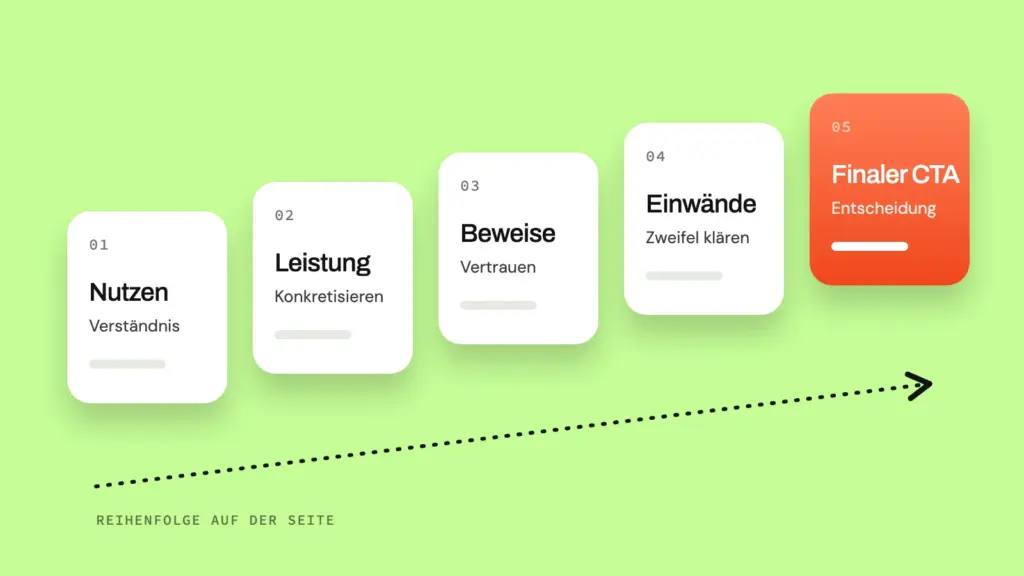
What each section needs to do and where it usually goes wrong:
| Section | Job | Typical mistake |
|---|---|---|
| Value proposition | Create understanding | Naming the method instead of the outcome |
| Service/process | Make it concrete | Feature list without context |
| Proof | Build trust | Vague claims without evidence |
| Answers to objections | Remove doubts | Everything pushed into the FAQ at the end |
| Final CTA | Trigger the decision | Competing actions |
This order isn’t dogma, but it follows a logic: nobody trusts an offer they haven’t understood. And nobody acts on trust alone if they don’t know what happens when they click.
How do you present your value proposition and service so that visitors keep reading?
The value proposition names the outcome for the client – the change from state A to state B – not your method. The service description then makes concrete what happens along the way. If you list features and jargon instead, you leave the translation work to the visitor. And they won’t do it.
These first two rows of the table above deserve a closer look – this is where most landing pages already lose their readers.
The visitor isn’t buying a process but an outcome. An example shows the difference: “We build responsive WordPress websites with custom design” describes the method. “A website that turns visitors into enquiries” describes the outcome. The method belongs on the page – but as proof of the outcome, not as the headline. There isn’t much time anyway: according to research by Nielsen Norman Group, users often leave web pages after just 10 to 20 seconds – your value proposition needs to be clear within about 10 seconds.
The service becomes concrete as a clear sequence rather than a list: discovery call, concept, implementation, handover – three to four steps are enough. This answers the silent question “What happens if I get in touch?” and lowers the threshold before the CTA. Uncertainty about the process is a distinct, often overlooked reason to leave – precisely because no visitor ever phrases it as an objection.
How many calls to action can a landing page really handle?
A landing page can handle exactly one primary action, repeated several times – not several different actions. Every additional option the visitor has to choose between lowers the likelihood that they’ll choose any of them.
That doesn’t mean the call to action may appear only once – it can and should appear several times (top, middle, end), but always with the same action and wording. It becomes a problem when you offer a download, a newsletter sign-up and a social media link alongside the contact form: each option makes sense on its own, but together they make the visitor weigh things up instead of acting. A landing page isn’t a place to explore; it’s a decision point.
A worked example: imagine a trades business that has placed a contact form, a newsletter sign-up and a PDF checklist download side by side on its landing page. A visitor who actually wanted to get in touch sees three equally prominent options and first has to decide which one is right – before even getting to the actual action. They often choose the least committal option, the PDF download, because it means the least effort, and leave the page without making contact. If the business reduces the page to a single action – the contact form – this weighing-up disappears: the only remaining decision is whether to act at all, not which of three actions is the right one.
Where does social proof belong to be effective?
Social proof has two jobs in two different places on the page: in the hero, in compact form, it lowers the initial baseline scepticism before the visitor even reads; further down the page, it defuses specific objections exactly where they arise. If you mix the two – full testimonials in the hero, logos somewhere further down – you waste both effects.
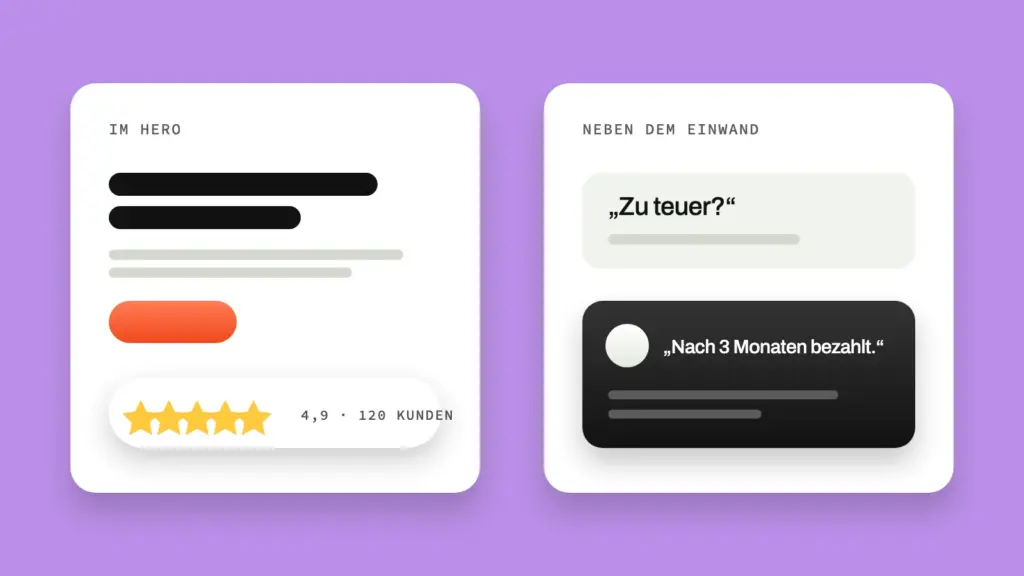
Hero: lower baseline scepticism
What belongs on the first screen and why is already covered above in the section on the area visible without scrolling. On placement: the signal typically sits directly below the call to action or at the bottom edge of the first screen – close enough to support the decision, subtle enough not to compete with it.
If you don’t have well-known brand logos to show, replace them with concrete, verifiable statements – for example something like “X projects since founding year” instead of the vague phrase “many years of experience”.
Further down the page: defuse objections
If the most likely objection is “Does this work in my industry too?”, a fitting example or a credible reference belongs exactly where this doubt arises – not isolated in a separate “Clients” section that only some visitors reach anyway.
Important: social proof must be concrete and verifiable. Vague claims such as “many satisfied customers” without evidence tend to create distrust rather than build trust – they show exactly the vagueness a sceptical visitor already suspects.
How strongly reviews can work as social proof was examined by the Spiegel Research Center at Northwestern University for e-commerce product pages: simply displaying reviews increased conversion measurably – by 190 percent for lower-priced products and by 380 percent for higher-priced ones. And just a few are enough: products with five reviews were almost four times as likely to be purchased as products without. Also striking: ratings between 4.2 and 4.7 stars converted better than the seemingly perfect 5.0 – perfection quickly seems “too good to be true”. This is product page research, not a study of service landing pages – the mechanism that reviews lower perceived risk carries over; the percentages don’t one-to-one.
How do you clear objections out of the way before the visitor leaves?
You answer objections most effectively where they arise – not collected in an FAQ section that often isn’t read at all, but embedded right next to the statement that triggers the doubt. An FAQ block at the end still makes sense, but it’s the last safety net, not the only answer.
The most reliable method: collect the most common questions and concerns of your target audience – from real client conversations, emails or support requests – and answer them proactively before the visitor has to ask. Typical candidates are questions about price, effort, timeframe or compatibility with existing systems. If you address them openly instead of avoiding them, you come across as more credible than a page that only shows benefits and hides inconvenient points.
A worked example: imagine a consulting service where the visitor almost always carries the unspoken objection “How much effort will this mean for me?”. The answer doesn’t belong in the FAQ but as a single sentence right next to the service description: “Effort: two sessions of 60 minutes each.” That way, one sentence neutralizes the objection before it hardens into conscious doubt.
Why does the form often decide conversion – not the content before it?
The form is the point where interest turns into action – and every additional field is a new opportunity to give up. The more convincing the page has been up to that point, the more frustrating a form that calls this conviction into question at the final step.
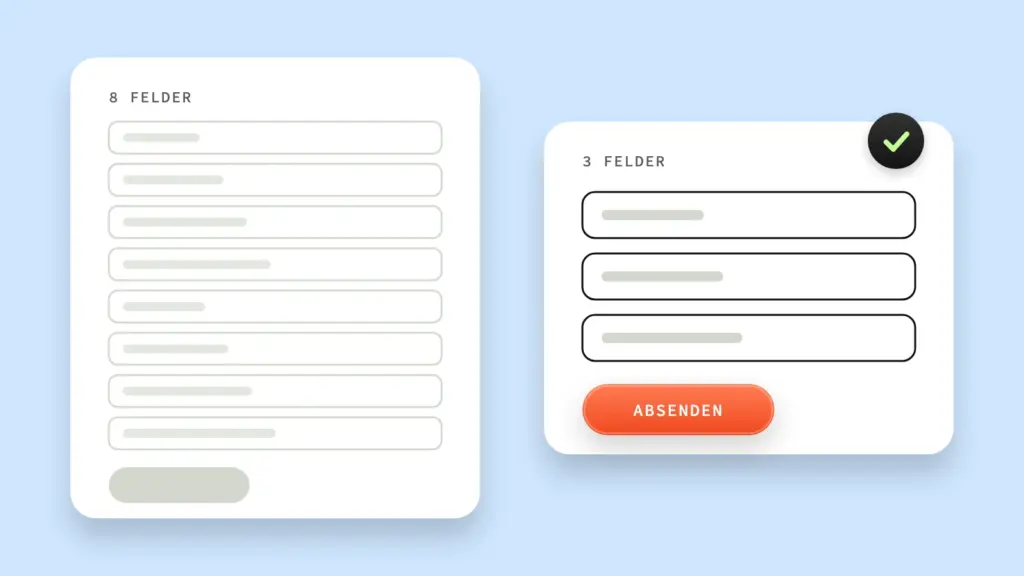
A common mistake: forms are filled with fields that would be handy for internal processing but aren’t needed for a first contact – company size, budget, preferred date, several free-text fields. Each of these fields lowers the likelihood that the form gets submitted. In the first step, ask only for what’s essential (name, contact method, a short description of the request) and clarify everything else in a conversation or a follow-up email. If a multi-step form makes sense to you, the same rule applies as for the rest of the page: every step of the form must make its purpose clear, otherwise it becomes a reason to leave.
How much individual fields weigh is shown by the checkout research of the Baymard Institute: the average e-commerce checkout contains 11.3 form fields, even though around 8 are usually enough – and the number of fields affects the experience more than the number of steps. The study comes from e-commerce checkouts, but the underlying mechanism – every additional field increases perceived complexity – applies to contact forms just as much.
Frequently asked questions about landing page structure
Is a beautifully designed landing page automatically a high-converting landing page?
No. Design influences how trustworthy and pleasant a page feels, but it doesn’t decide whether the visitor understands what to do. A visually impressive page with an unclear structure often converts worse than a plain page with clear guidance.
How long should a landing page be?
As long as it takes to build understanding, trust and a decision in that order – no longer. A simple, inexpensive offer needs fewer sections than a complex service that requires explanation.
Is a single call-to-action button on the whole page enough?
One button is rarely enough if the page is longer than one screen. Repeat the same call to action in several places instead of placing it only once – but stick to a single action.
Conclusion
A landing page that doesn’t convert rarely has a design problem – it usually has a structure problem. Design remains important; it creates trust and reduces friction. But it doesn’t make up for an unclear order, competing calls to action or unanswered objections. So if you want to rework your own landing page, check the structure before any design question: does each section lead logically to the next? Is there exactly one action the page leads to? And is every likely objection answered before the visitor has to put it into words?
How this logic applies to your whole website is covered in the guide to conversion optimization for SMEs. No secret recipe. Just a structure that’s been thought through to the end.