Planning your page structure means deciding, for every page on your website, what job it does, who it speaks to, which question it answers and which next step it leads to, before any layout exists. Sounds like tedious paperwork. But this planning decides whether your visitors are guided or left wandering.
Many websites start differently: with a list of menu items borrowed from the competition. Home, About us, Services, Case studies, Contact. That is a sitemap. For a structure that works, each page still needs its brief. We call this version a goal structure.
Key points at a glance
- A goal structure sets out, for every page on your website, what it should achieve.
- Every page needs four entries: purpose, audience, core question and exactly one next step. If you can’t fill the four fields, the page is usually redundant or should be merged with another one.
- The next step depends on the page: a guide leads to the matching service, the service page to the initial call, the thank-you page to preparation.
- Services with their own audience need their own pages. A catch-all page that covers three services in a paragraph each doesn’t really answer anyone’s question.
- The page structure sets out which pages exist and what each should achieve. The wireframe then shows how each individual page is built.
How is a goal structure different from a sitemap?
A sitemap is an inventory: it shows which pages exist and how they connect in the menu. A goal structure adds each page’s brief. It answers whom the page should convince, of what, and where the visitor goes next. That way you can see at a glance which page does which job.
Take the menu item “Services”. In the sitemap it is a box. In the goal structure it gets a row: purpose “convince visitors that the consultancy fits their situation”, core question “Is this the right help for me?”, next step “Book an initial call”.
Whether missing page goals really are your problem is best checked first: in the article Website not bringing in enquiries? It’s rarely the design, a table matches typical symptoms to the four common causes, for example visitors bouncing from subpages to “pages without a goal”.
Which four entries does every page need?
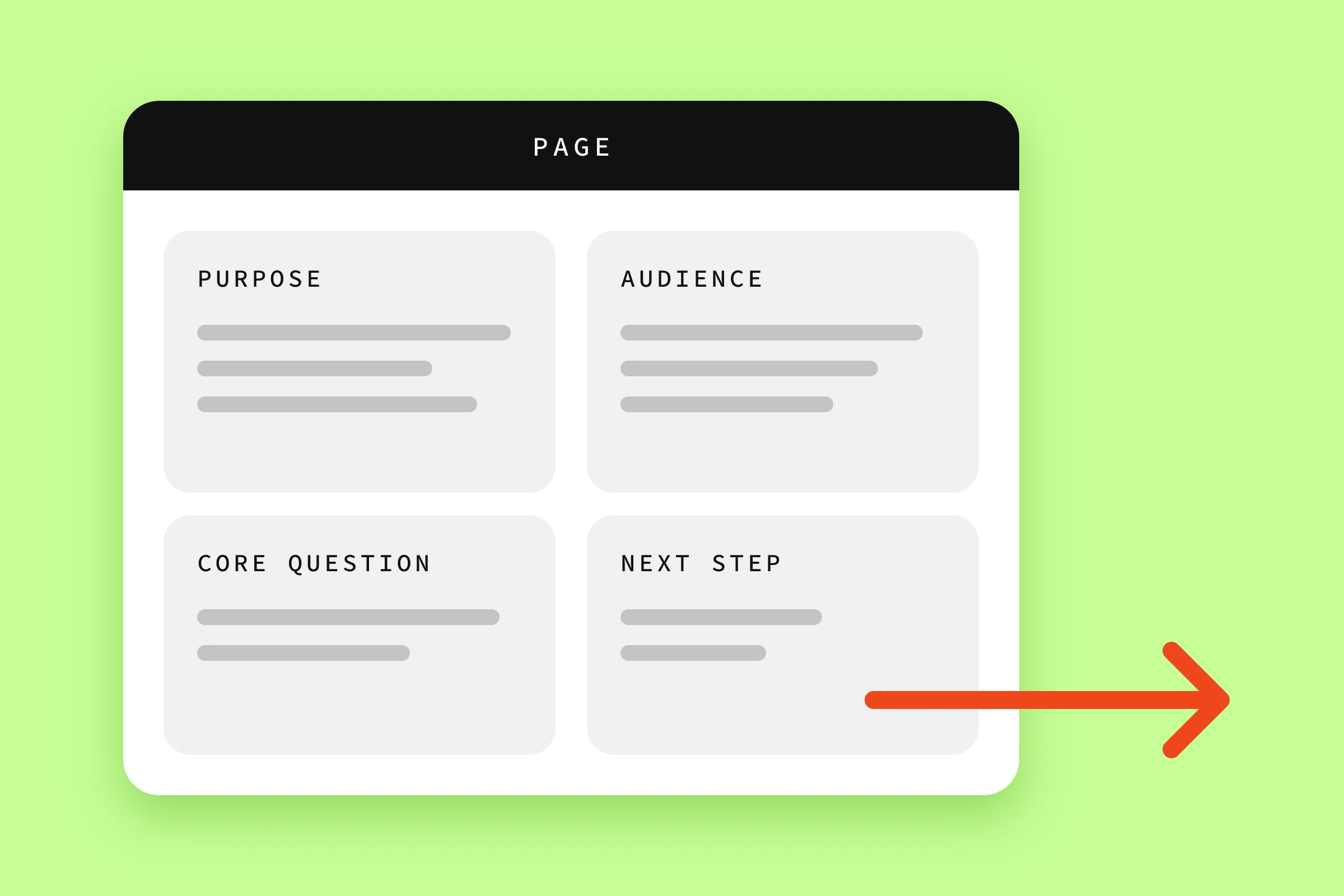
Every page needs four entries. The purpose says what it should achieve, the audience who it is written for. The core question is the visitor’s question that the page answers. The next step shows where the page sends them afterwards. All four fit in one table row.
Purpose
“Inform” makes a poor purpose, because it leaves open what the visitor knows afterwards. Phrase it as what is different in their head after the visit. For example: “The visitor understands that we do succession planning for owner-managed businesses.”
Audience
Not every page speaks to everyone. The homepage may have to catch three groups, a service page usually just one. With a named audience per page, you get the tone, examples and evidence more precisely right. The owner of a family business reads a page on succession with different worries than an HR manager looking for coaching for their leadership team. Pages like About us or Contact are visited by every group. There, instead of the audience, you enter the decision stage: is your visitor still gathering information or close to getting in touch?
Core question
The core question is the one question a visitor brings to exactly this page. On a service page it is often: “Is this the right help for my situation?” On the About us page more likely: “Who am I dealing with here?” Write the question down the way your customers ask it. The easiest place to find it is in enquiry emails.
Next step
If your visitors are still working out whether they’re in the right place, they won’t book an appointment. Their next step is then another page that answers their question. If they’re already convinced, it’s the initial call. Each page puts one of these two steps first, depending on its core question.
What does a page structure look like for a consultancy with several services?
A page structure for a consultancy with several services gives each service its own page, because audience and core question differ. Homepage and case studies route visitors to the right service, the About us page builds trust. Guides lead to the matching service, the service pages to the initial call.
Take as a typical example a management consultancy for SMEs with three services: succession planning, process optimisation and leadership coaching. The table shows what a goal structure for it could look like. Adapt it to your own offer.
| Page | Purpose | Audience / stage | Core question | Next step (link text) |
|---|---|---|---|---|
| Homepage | Visitors see within seconds whether they’re in the right place and find their service | All three audiences, first-time visitors | “Do they help people like me?” | To the matching service, e.g. “Plan your succession safely” |
| Succession planning | Convince visitors that the consultancy guides the handover securely | Owners who want to hand over their business | “How does the handover succeed without the business suffering?” | “Book an initial call on succession” |
| Process optimisation | Show which processes are improved and how the project runs | Managing directors of growing businesses | “Where are we losing time in our processes?” | Book an initial call |
| Leadership coaching | Build trust in the method and the coach | HR managers, new leaders | “Does the coaching suit our people?” | Book an initial call |
| About us | Make the people behind the consultancy tangible | Visitors close to a decision | “Who am I dealing with here?” | Book an initial call |
| Case studies | Prove that the consultancy has helped in similar cases | Sceptical visitors from all three groups | “Have they done something like this before?” | To the matching service |
| Process & fees | Reduce uncertainty about effort and price | Visitors who are already comparing | “What will this cost me in time and money?” | Book an initial call |
| Guide article | Answer a specific question and show expertise | Searchers at an early stage | One per article, e.g. “When should I plan my succession?” | “How succession consulting works” |
| Initial call / Contact | Make getting in touch as easy as possible | Visitors who have decided | “What happens when I get in touch?” | “Choose a time” |
| Thank-you page | Confirm and prepare for the call | New enquirers | “What happens next?” | Fill in a short preparation questionnaire |
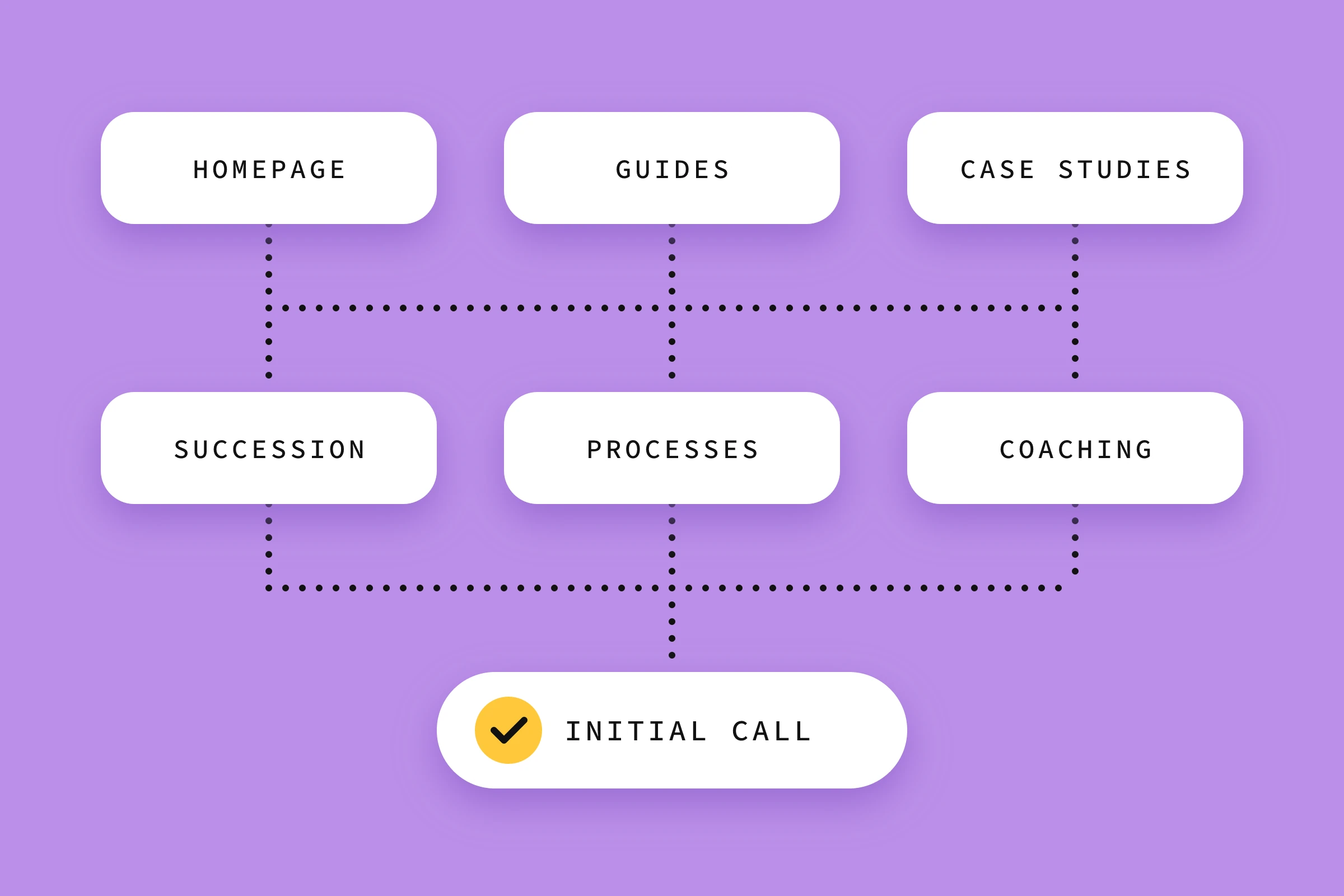
The three services get their own pages because their audiences have little in common. A single “Our services” page with three paragraphs wouldn’t seriously answer any of the three core questions. For secondary services without an audience of their own, a section on the main service’s page is usually the better choice.
I remember a client project in coaching. The provider had a whole range of secondary services on her website, some of which differed only in details, but each had its own “marketing name” and its own service page. The pages themselves were all rather thin and gave visitors no clear guidance. So we had two challenges to solve.
First, to consolidate the offer so that visitors aren’t overwhelmed by the sheer number of options and are guided straight to the service that suits them. In the end, two service pages remained: coaching and training. The other secondary services were dropped or absorbed into these two offers.
Second, the service pages themselves needed completely new content.
How do next steps become a path to an enquiry?
A page should put exactly one next step first. Further links in the menu and footer are still fine, but they take a back seat to this step. Across the pages, the main steps form a chain: from the guide to the service, from the service to the initial call.
How to design, place and repeat that one main step on a single page is covered in our article Landing page structure: these elements really convert. For the page structure, what matters is which page hands the visitor on to which.
For this path to work, the transitions have to be clear. The Nielsen Norman Group calls this information scent: visitors click the link that most promises to answer their question. A link saying “Details” promises little. “How succession consulting works” tells the owner from the example what she’ll find behind it.
Write the exact wording of the link or button straight into the “Next step” column, as in the example table. If that wording doesn’t match the core question of the target page, either the transition is wrong or the target page has the wrong question.
How do you plan your page structure?
You plan your page structure in five steps. You collect the pages and fill in the four fields (purpose, audience, core question, next step) for each one. Pages without a core question of their own are cut or merged. Then you walk through the paths of typical visitors and name the navigation in your customers’ words.
- Collect the pages. Write down every page you have or think you need. For a relaunch, include the existing subpages that hardly anyone visits.
- Fill in the four fields. Set up a table like the one above, one row per page. A spreadsheet is all you need. Be strict about the core question: one question, in your customers’ language.
- Cut and merge. Pages with empty or duplicate fields go under review. Two pages with the same core question compete with each other.
- Walk through the paths. Take two or three typical visitors. For example, the owner lands on a guide article via search, while the HR manager comes straight to the homepage via a recommendation. Follow the next steps each time. Wherever you hit a dead end or a skipped page, you correct the structure.
- Name the navigation. The menu items use your customers’ words. A simple card sort shows how customers would group your topics: participants sort cards with your page topics in whatever way makes sense to them. An informal test with a few customers shows first tendencies; for a proper study, the Nielsen Norman Group recommends at least 15 participants.
In practice, the typical pattern already shows at the first joint look at the existing site, the same pattern that shaped the coaching project above. The client thinks: “The more I can offer, the better my chances that there’s something right for the visitor.” A false assumption that, in our experience, leads to a high bounce rate and a poor conversion rate. Carefully planning the page structure corrects this early on.
Which mistakes are common when planning a page structure?
The most common page structure mistakes happen when the structure follows how your company is organised. Typical examples are menus based on the org chart, a core service lost among secondary services, nesting that goes too deep, pages that exist out of habit and content that ends in a dead end because nobody planned a next step.
| Mistake | How to spot it | Better |
|---|---|---|
| Structure based on the org chart | Menu items are named after your departments | Organise by your customers’ questions |
| Core service gets lost | Main and secondary services sit side by side in the menu | Core service first, secondary services as a section |
| Nesting too deep | Important services sit in the third menu level | Key pages reachable directly from the menu |
| Pages out of habit | “News” or “Team” with no recognisable purpose | Fill in the four fields or cut the page |
| Guides as dead ends | Articles end without a link to a service | Every article links to the service it fits |

Structures are often planned once and never looked at again. But with every new service or shifted audience, they need a new row. Revisit yours with every new service and every new guide article.
Frequently asked questions about page structure
How many pages does a small business website need?
As many as there are distinct core questions, and no more. For a business with one service and one audience, a homepage, service page, About us, Contact and the mandatory pages such as legal notice and privacy policy are often enough. Every additional service with its own audience justifies its own page.
Does every service need its own page?
A page of its own pays off as soon as a service’s audience or core question differs clearly from the others. The page can then address their questions, objections and evidence specifically. If two services are closely related and aimed at the same people, you can combine them on one page, as long as a shared core question holds them together.
What is the difference between a page structure and an XML sitemap?
The XML sitemap is a technical file for search engines. It lists the addresses of your pages so that Google and other services can find them. The page structure is a planning tool for people: it sets out which pages should exist and what each should achieve. Your content management system usually generates the XML sitemap automatically.
Can I improve the structure of an existing website later?
Yes. Fill in the four fields for your existing pages and close gaps with new links and sharper headings. If you merge or remove pages, set up a redirect from each old address to the new target page. That way, visitors from old links and search results still land on a suitable page.
Conclusion
A page structure that works is more than a list of menu items. Every page has a purpose, an audience, a core question and a next step. Together, these steps lead to an enquiry. Next, take your five most important pages and fill in the four fields for each. Wherever a field stays empty, that’s your first starting point.
In our strategy phase “Clear Course”, the page structure is created as part of the concept, before any design work starts. For an independent look at your current website, get our free website check by video.
Sources
- Budiu, R. (2020): Information Scent: How Users Decide Where to Go Next. Nielsen Norman Group.
- Tankala, S. & Sherwin, K. (2024): Card Sorting: Uncover Users’ Mental Models for Better Information Architecture. Nielsen Norman Group.