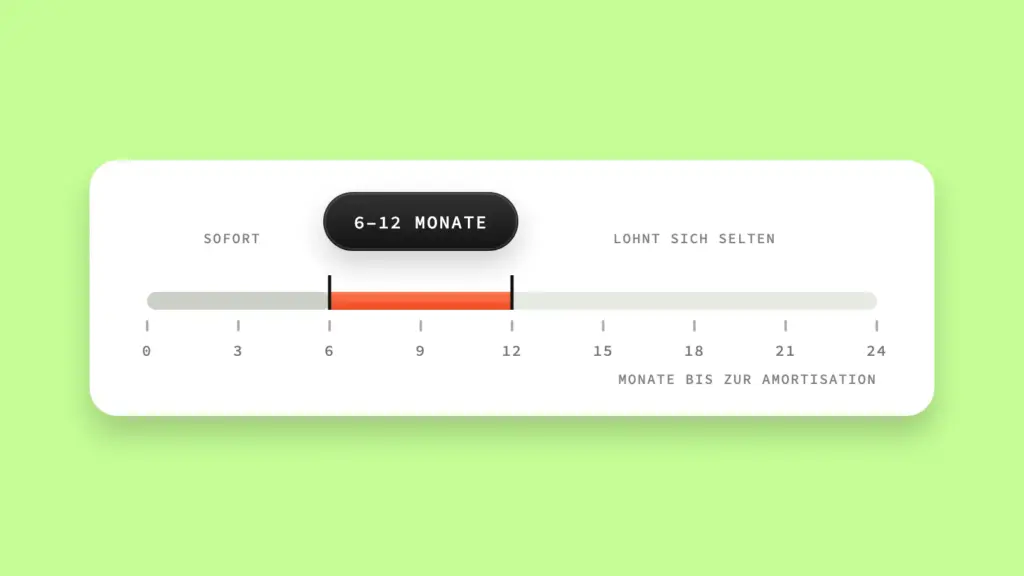
Automation pays off when the annual effort of a process – time multiplied by frequency, plus the cost of recurring errors – exceeds the one-off setup effort within six to twelve months. If a process falls below this threshold, automating it costs more than it saves. Very few people do this calculation before they get started.
I often see this with freelancers and small teams: someone hears about n8n or Zapier but has never thought through the basics of workflow automation, and automates the first process that comes to mind. Sometimes that’s a good idea. Sometimes you spend days building an automation for something that happens twice a year. So: numbers instead of gut feeling.
Key takeaways
- Automation pays off when the annual effort of a process – time multiplied by frequency, plus error costs – exceeds the setup effort within six to twelve months.
- The formula is simple: frequency × time per run + error costs, compared with the one-off setup effort plus running costs.
- Error costs often weigh more than pure time savings – delayed payments or lost leads frequently cost more than the hours manual execution takes.
- Processes that run less than once a month or vary heavily and can hardly be standardized are usually not worth automating.
- The invoicing example shows it concretely: with 96 invoices a year, the automation pays for itself well within the six-month mark.
When does automation pay off at all?
A process is worth automating if its annual costs – time spent plus error costs – recoup the setup effort within about six to twelve months. That’s the rule of thumb you use to roughly pre-sort every automation idea before you even open a tool.
The formula behind it is simple:
Annual effort = (frequency × time per run) + error costs

You compare this value with the setup effort – your time for the setup plus ongoing tool costs. If the annual effort is clearly greater than what the setup costs, you have a good candidate. If it’s smaller or about the same, leave it alone. It’s not rocket science, but this exact step is completely missing from most automation decisions.
How do you calculate how much time a process really costs?
You calculate the time spent by multiplying how often a process runs per year by the time a single run takes – including context switching, not just the pure clicking time. Most people underestimate this figure because they only count the “actual” task, not everything around it.
Take an example: you transfer incoming contact enquiries manually from your form into the CRM. Five minutes per enquiry doesn’t sound like much at first. With 15 enquiries a month, that’s 900 minutes a year – 15 hours. Add the context switching – checking email, switching to the CRM, back to the email – and you realistically end up at 20 to 25 hours a year for a task that could be done automatically in a few seconds. That’s usually the moment when the numbers already add up.
Important: calculate with your actual hourly rate or what you could earn with that time instead. 15 hours mean something completely different for a freelancer charging €80 an hour than for a team in which a working student handles the task.
What do errors cost that automation could prevent?
Error costs arise where manual processes regularly go wrong – forgotten follow-ups, incorrectly transferred data, missed deadlines – and you have to weigh these errors in time, money or lost trust. For many processes, error costs clearly exceed the pure time spent.
An example: every now and then you forget to send an invoice because it gets lost among other tasks. If this happens three or four times a year and each time a payment is delayed by two to three weeks, that’s a cash-flow problem, not just a time problem. Or: a lead signs up, but the welcome email gets lost because you were in a client meeting. The lead goes cold before you respond – undermining exactly the conversion optimization you invest in elsewhere. These costs are harder to express in hours, but they belong in your calculation – otherwise you’ll systematically underestimate what an error-prone process really costs you.
How high is the setup effort really?
The setup effort includes not only the hours you or your service provider need for the build, but also ongoing tool costs and the maintenance every automation causes over its lifetime. Anyone who only counts build time almost always underestimates the real costs.
A simple automation – for example automatically transferring form data to the CRM – can be built in a few hours and costs hardly anything afterwards. A more complex automation with several systems, error handling and special cases can quickly eat up several days of build time and then incur monthly tool fees. On top of that: every automation needs maintenance. If an API changes, a form field changes or a tool update breaks something, the repair costs time. Plan for this realistically, not optimistically.
Worked example: does automating your invoicing pay off?
Yes, in most cases – as soon as you put frequency, time spent, error costs and setup effort side by side, the calculation for this process almost always tips in favour of automation. Here you can see how the individual factors from the sections above work together.
Suppose you write 8 invoices a month manually, each costing you 12 minutes including switching between the order overview, invoicing tool and filing. That’s 96 invoices a year, about 19 hours of pure time. Add the error costs: twice a year an invoice slips through and the payment is delayed by two to three weeks. If cash flow is tight, that’s worth more than the pure time saved.
| Factor | Value |
|---|---|
| Frequency | 96 × per year |
| Time per run | 12 minutes |
| Time spent per year | ~19 hours |
| Error costs | 2× delayed payment of 2–3 weeks each |
| Setup effort (one-off) | approx. 4–6 hours of setup |
| Running costs | Automation tool, often already part of your existing stack |
At an hourly rate of €70, the 19 hours are worth around €1,330 – plus the hard-to-quantify but real cash-flow advantage from avoided payment delays. Against that stands a setup effort of a few hours. The payback lies well within the six-month mark from the rule of thumb above – a clear case for automation.
Compare this with a process that only runs twice a year and takes 20 minutes: 40 minutes of annual effort against the same setup effort of 4 to 6 hours. Here the picture turns completely – the automation would only pay for itself after many years, if at all. This very comparison shows why the calculation has to come before the tool, not after.
Below which threshold does automation not pay off?
Automation usually doesn’t pay off if a process runs less than once a month, if it varies heavily and can hardly be standardized, or if the setup takes longer than the time you’d save over the next two years. These are exactly the cases that are most often automated anyway – on principle, not on calculation.
A process that runs twice a year and takes half an hour each time costs you one hour of annual effort. Almost no automation is worth it for that, however elegant the solution. The same goes for processes that run differently every time – many special cases, exceptions, human judgement. The automation either becomes so complex that the setup effort explodes, or it only covers half the cases and you do the rest manually anyway. Then you have two systems instead of one – and more work, not less.
The honest consequence: not every process in your business is a candidate for automation. Some tasks are better left manual, because the effort of automating them reliably is greater than what you gain.
Frequently asked questions
From how many repetitions per year does automation pay off?
There’s no reliable blanket rule – it depends on the time per run and the setup effort. As a rough guide: processes that run less than monthly only pay off if the individual effort or the error costs are very high.
Do error costs really count in the calculation?
Yes, and they often weigh more than the pure time spent. Delayed payments, lost leads or compliance errors frequently cost more than the hours manual execution takes.
What if I don’t know the setup effort exactly?
Get a rough quote or time estimate before you calculate. Without this figure you’re missing the second half of the equation – and the decision remains gut feeling.
Conclusion
Automation isn’t an end in itself. It pays off when a process’s frequency, duration and error costs outweigh the setup effort within six to twelve months – and it doesn’t pay off when a process is rare, irregular or too individual for a clean rule. Before you next open a tool: do a quick calculation. Ten minutes with pen and paper will save you days of work on an automation you didn’t actually need.